
Slackはスマホ利用中と表示する?APIで確かめました
表示しません。SlackのプレゼンスAPIが同僚に返すのはアクティブか離席中だけで、端末はわかりません。スマホが記録されるのは自分のアカウントのアクセスログだけで、有料プランの管理者はそれを書き出せます。
表示しません。デスクトップアプリでも、ブラウザーのタブでも、スマホでも、同僚に見えるのは同じ緑の点で、横にスマホのマークやラベルはつきません。スマホで点が緑になるのは、Slackのアプリが画面に出ているあいだだけです。別のアプリに切り替えるかスマホをロックすると、離席中になります。2026年10月2日に、同僚が何を読み取れるかを確かめました。SlackのプレゼンスAPIがほかの人について返すのは active か away の一語だけで、端末については何も返しません。端末が記録されるのは1か所だけで、自分のアカウントのアクセスログです。これは自分で読めるほか、有料プランの管理者はワークスペース全体のログを書き出せます。
同僚のSlackがあなたについて読み取れること
メンバー4人のテスト用ワークスペースで、自分に対して1回、ほかの3人それぞれに対して1回ずつ users.getPresence を呼びました。同僚のアプリや、同僚が入れたボットがあなたについて受け取るのは、これだけです。
{"ok": true, "presence": "away"}自分のアカウントに対しては、同じ呼び出しがもう少し多くを返しましたが、やはり端末の情報はありません。
{"ok": true, "presence": "away", "online": true, "auto_away": true,
 "manual_away": false, "connection_count": 1, "last_activity": 1790881201}
connection_count は開いているSlackのセッションの数で、スマホもノートPCも同じ1つとして数えます。どちらの答えにも、iPhone、Android、Mac、ブラウザーといった言葉は出てきません。プロフィールカード、メンバー一覧、会話の見出しにも、端末のラベルのない同じ点が出るだけです。
Slackがスマホを記録する場所:アクセスログ
どのアカウントにも、アカウント設定 の アクセスログ にログがあります(https://<ワークスペース>.slack.com/account/logs)。サインインごとにアプリが記録されるので、スマホは名前で出てきます。下は10月1日と2日の、仕事用ワークスペースでの私たち自身のログです。IPアドレスと場所は伏せています。
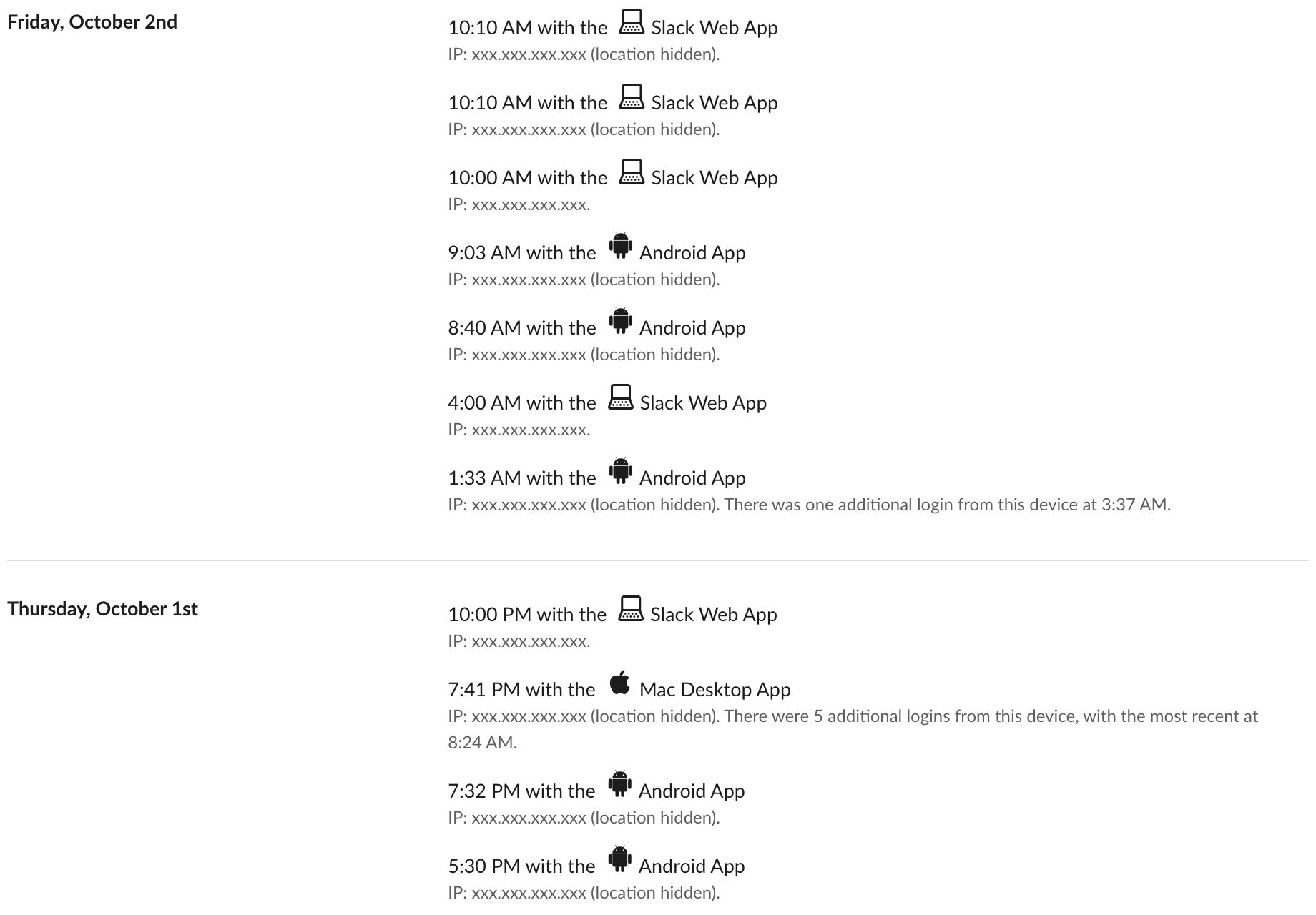
ここから読み取れることは3つです。
- • アプリ名は Android App(Androidアプリ)、Mac Desktop App(Macのデスクトップアプリ)、Slack Web App(Webアプリ)で、それぞれにアイコンがあります。
- • 1行は時刻つきのセッション開始で、使っていた時間ではありません。Androidの行は1日に何度も出ました(10月2日の午前1時33分、8時40分、9時3分)。同じ端末からのサインインが続くと、「There were 5 additional logins from this device」(この端末からほかに5回のログイン)のような注記にまとめられます。
- • テスト用ワークスペースでは、ブラウザーのタブを2つ追加しても行は増えませんでした。スマホを何分開いていたかは、このログからはわかりません。
スマホをサインインさせる方法の1つは、パソコンの Sign in on mobile(モバイルでサインイン)に出るコードを読み取ることです。そのコードに何が入っているかはQRコードでSlackにモバイルからサインインする方法にあります。
自分のログはどのプランでも自分で読めます。私たちはフリープランのワークスペースと仕事用のワークスペースで確認しました。ほかの誰が読めるかはプランによります。
管理者に見えること:プラン別
| 見る人 | 端末がわかるか | どこで |
|---|---|---|
| 同僚やボット | わからない | users.getPresence が返すのは active か away だけ |
| 自分 | わかる | 自分のアクセスログ(全プラン) |
| フリープランの管理者 | わからない | アナリティクスは概要とチャンネルだけ。ワークスペースのアクセスログのAPIは paid_only を返す |
| プロ、ビジネスプラス、Enterpriseの管理者 | わかる | セッションごとのワークスペースのアクセスログと、iOS、Android、デスクトップごとの最終アクティブ日を含むメンバーのアナリティクス |
フリープランの行は、自分たちのワークスペースで確かめました。アナリティクスのメニューには概要とチャンネルしかなく、9月29日に team.accessLogs は paid_only と答えました。有料プランの行はSlackの管理者向けドキュメントによるもので、画面を撮れる有料のワークスペースは持っていません。有料プランのメンバーのアナリティクスに出るのは日付で、時刻ではありません。
管理者に見えることと見えないことは、Slackの管理者はDMを見られるかとSlackは従業員の監視に使えるかにまとめています。スマホそのものについて知りたい場合は、会社はスマホでの行動を見られるかをご覧ください。
スマホでの点の動き
Slackのヘルプセンターによると、アクティブになるのは「デスクトップかモバイル端末でSlackが開いているとき」で、離席中になるのは「デスクトップで10分間操作がないとき、またはモバイル端末でアプリから離れるか閉じたとき」です。つまり点はどこでも同じに見えますが、続く時間が違います。
スマホとパソコンをSlackがどう1つの点にまとめるかは複数の端末でのSlackのアクティブ表示にあります。私たちのテストでは、どれか1つのセッションが開いていれば点は緑のままでした。スマホで仕事をしていて、アプリを開いている数秒ではなく勤務時間に合わせて点を出したいなら、Slack Greenがスマホをロックしたままでも決めた時間帯にSlackの在席状況をアクティブに保ちます。
よくある質問
スマホから返信したことは上司にわかりますか?
Slackの画面からはわかりません。メッセージに端末のラベルはつきません。その日スマホを使ったことがわかるのは、有料プランの管理者がアクセスログかメンバーのアナリティクスを読んだ場合だけです。
スマホでメッセージを読んだだけでもアクセスログに出ますか?
出るのは、スマホでセッションが始まったことと、その時刻です。何を読んだかや、どのくらい読んでいたかは出ません。
アクセスログからスマホを隠せますか?
隠せません。同じページの すべてのセッションからサインアウト で使っていないセッションを終わらせることはできますが、過去の行は残ります。
関連記事
Slackのハドルに参加すると、ほかの人にわかる?
わかります。参加者の一覧に表示され、サイドバーにも誰が入っているかが出ます。マイクをミュートにし、カメラをオフにして参加することはできますが、見えないように参加する方法はありません。
Slackでプロフィールを見ると相手に通知される?されません
Slackでは、相手のプロフィールを開いても、名前にカーソルを合わせても、ステータスを確かめても、相手には何も届きません。見た人の一覧もなく、管理者にも分かりません。相手が気づくのは、DMでの入力中の表示、メッセージ、リアクション、メンション、ハドルです。
Slackはマウスの動きを追跡する?しません
いいえ。Slackのデスクトップアプリが読むのは、コンピューターがどれだけ操作されていないかという1つの数字と、端末ごとの接続状態だけです。マウスの動いた先、画面、キー入力は記録しません。チェックの中身、プライバシー、管理者に見えるもの。