
슬랙은 휴대폰 사용 중이라고 표시할까? API로 확인했습니다
아니요. 슬랙의 프레즌스 API는 동료에게 활성 또는 자리 비움만 알려 주고 기기는 알려 주지 않습니다. 휴대폰이 남는 곳은 내 계정의 접근 로그뿐이며, 유료 요금제 관리자는 이를 내려받을 수 있습니다.
표시하지 않습니다. 데스크톱 앱이든 브라우저 탭이든 휴대폰이든 동료에게는 같은 초록 점이 보이고, 옆에 휴대폰 표시나 라벨이 붙지 않습니다. 휴대폰에서 점이 초록색인 것은 슬랙 앱이 화면에 열려 있는 동안뿐이고, 다른 앱으로 넘어가거나 휴대폰을 잠그면 자리 비움이 됩니다. 2026년 10월 2일에 동료가 무엇을 읽을 수 있는지 확인했습니다. 슬랙의 프레즌스 API가 다른 사람에 대해 돌려주는 것은 active나 away 한 단어뿐이고, 기기에 대해서는 아무것도 알려 주지 않습니다. 기기가 기록되는 곳은 한 군데, 내 계정의 접근 로그입니다. 이 로그는 나도 읽을 수 있고, 유료 요금제의 관리자는 워크스페이스 전체 분량을 내려받을 수 있습니다.
동료의 슬랙이 나에 대해 읽을 수 있는 것
멤버 네 명인 테스트 워크스페이스에서 나 자신에게 한 번, 다른 세 명에게 한 번씩 users.getPresence를 호출했습니다. 동료의 앱이나 동료가 설치한 봇이 나에 대해 받는 것은 정확히 이것입니다.
{"ok": true, "presence": "away"}내 계정에 대해서는 같은 호출이 조금 더 많은 정보를 돌려주었지만, 여전히 기기 정보는 없었습니다.
{"ok": true, "presence": "away", "online": true, "auto_away": true,
"manual_away": false, "connection_count": 1, "last_activity": 1790881201}connection_count는 열려 있는 슬랙 세션 수이고, 휴대폰도 노트북과 똑같이 하나로 셉니다. 두 응답 어디에도 iPhone, Android, Mac, 브라우저 같은 말은 없습니다. 프로필 카드, 멤버 목록, 대화 상단에도 기기 라벨 없이 같은 점만 나옵니다.
슬랙이 휴대폰을 기록하는 곳: 접근 로그
모든 계정에는 계정 설정의 접근 로그에 로그가 있습니다(https://<워크스페이스>.slack.com/account/logs). 로그인마다 앱이 기록되므로 휴대폰은 이름으로 나옵니다. 아래는 10월 1일과 2일, 업무용 워크스페이스에 남은 저희 로그이며 IP 주소와 위치는 가렸습니다.
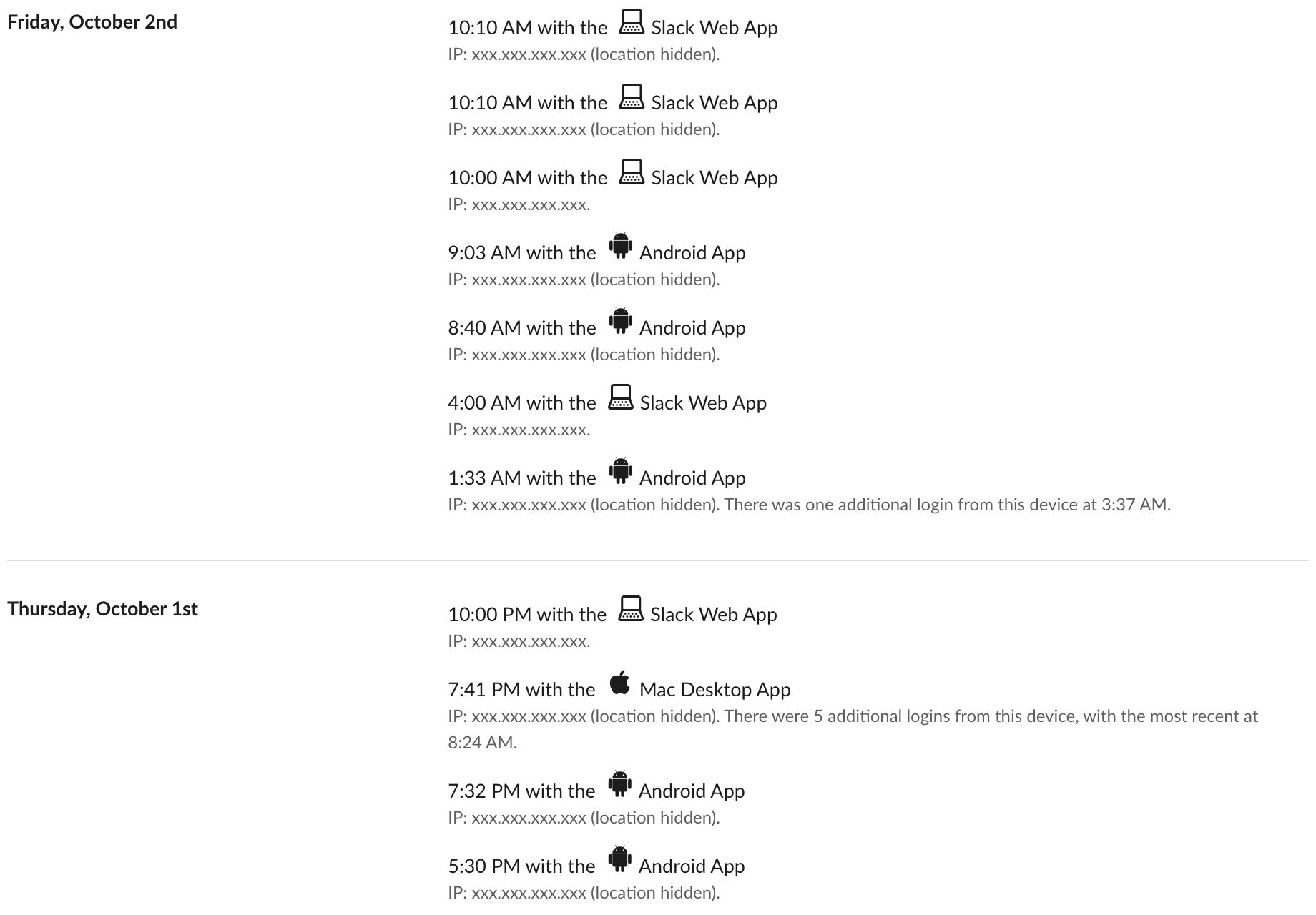
여기서 읽을 수 있는 것은 세 가지입니다.
- • 앱 이름은 Android App(안드로이드 앱), Mac Desktop App(Mac 데스크톱 앱), Slack Web App(웹 앱)이고 각각 아이콘이 있습니다.
- • 한 행은 시각이 붙은 세션 시작이지 사용한 시간이 아닙니다. 안드로이드 행은 하루에도 여러 번 나왔습니다(10월 2일 오전 1시 33분, 8시 40분, 9시 3분). 같은 기기에서 로그인이 반복되면 "There were 5 additional logins from this device"(이 기기에서 로그인 5회 더 있음) 같은 메모로 묶입니다.
- • 테스트 워크스페이스에서 브라우저 탭을 두 개 더 열어도 행은 늘지 않았습니다. 휴대폰을 얼마나 오래 열어 두었는지는 이 로그로 알 수 없습니다.
휴대폰을 로그인시키는 방법 하나는 컴퓨터의 Sign in on mobile(모바일에서 로그인) 아래 코드를 스캔하는 것입니다. 그 코드에 무엇이 들어 있는지는 QR 코드로 Slack 모바일 로그인하기에 있습니다.
내 로그는 모든 요금제에서 내가 볼 수 있습니다. 저희는 무료 워크스페이스와 업무용 워크스페이스에서 확인했습니다. 그 밖에 누가 볼 수 있는지는 요금제에 따라 다릅니다.
Slack에서 다시는 '자리 비움'으로 표시되지 마세요
클라우드 기반. 다운로드 불필요. 노트북이 꺼져 있어도 24시간 작동.
관리자가 볼 수 있는 것: 요금제별
| 보는 사람 | 기기를 알 수 있나 | 어디서 |
|---|---|---|
| 동료나 봇 | 없음 | users.getPresence는 active나 away만 돌려줌 |
| 나 | 있음 | 내 접근 로그(모든 요금제) |
| 무료 요금제 관리자 | 없음 | 분석에는 개요와 채널만 있고, 워크스페이스 접근 로그 API는 paid_only를 돌려줌 |
| 프로, 비즈니스+, 엔터프라이즈 관리자 | 있음 | 세션별 워크스페이스 접근 로그, iOS·안드로이드·데스크톱별 마지막 활동 날짜가 담긴 멤버 분석 |
무료 요금제 행은 저희가 소유한 워크스페이스에서 직접 확인했습니다. 분석 메뉴에는 개요와 채널만 있었고, 9월 29일에 team.accessLogs는 paid_only라고 답했습니다. 유료 요금제 행은 슬랙의 관리자 문서에서 가져왔으며, 화면을 찍을 유료 워크스페이스는 없습니다. 유료 요금제의 멤버 분석에는 시각이 아니라 날짜가 나옵니다.
관리자가 볼 수 있는 것과 볼 수 없는 것은 슬랙 관리자는 DM을 볼 수 있을까와 슬랙으로 직원을 감시할 수 있을까에 정리했습니다. 휴대폰 자체가 궁금하다면 회사는 내 휴대폰 사용을 볼 수 있을까를 보세요.
휴대폰에서 점이 움직이는 방식
슬랙 도움말 센터에 따르면 '데스크톱이나 모바일 기기에서 슬랙이 열려 있을 때' 활성이 되고, '데스크톱에서 10분 동안 활동이 없거나 모바일 기기에서 앱을 벗어나거나 닫았을 때' 자리 비움이 됩니다. 그래서 점은 어디서나 똑같아 보이지만 유지되는 시간이 다릅니다.
슬랙이 휴대폰과 컴퓨터를 어떻게 점 하나로 합치는지는 여러 기기에서의 슬랙 활성 상태에 있습니다. 저희 테스트에서는 세션이 하나라도 열려 있으면 점이 초록색으로 유지되었습니다. 휴대폰으로 일하면서 앱을 연 몇 초가 아니라 근무 시간에 맞춰 점이 보이길 원한다면, Slack Green이 휴대폰을 잠가 둔 채로도 정해 둔 시간대에 슬랙 접속 상태를 활성으로 유지합니다.
자주 묻는 질문
휴대폰으로 답장한 것을 상사가 알 수 있나요?
슬랙 화면에서는 알 수 없습니다. 메시지에는 기기 라벨이 붙지 않습니다. 그날 휴대폰을 썼다는 것은 유료 요금제의 관리자가 접근 로그나 멤버 분석을 볼 때만 알 수 있습니다.
휴대폰으로 메시지를 읽기만 해도 접근 로그에 남나요?
남는 것은 휴대폰에서 세션이 시작되었다는 사실과 그 시각입니다. 무엇을 읽었는지, 얼마나 오래 읽었는지는 남지 않습니다.
접근 로그에서 휴대폰을 숨길 수 있나요?
없습니다. 같은 페이지의 모든 세션에서 로그아웃으로 쓰지 않는 세션을 끝낼 수는 있지만, 지난 기록은 남습니다.
관련 기사
Slack 허들에 들어가면 다른 사람이 알 수 있을까?
알 수 있습니다. 참여자 목록에 내가 보이고, 사이드바에도 누가 들어와 있는지 나옵니다. 마이크를 음소거하고 카메라를 끈 채 들어갈 수는 있지만, 보이지 않게 들어갈 방법은 없습니다.
Slack에서 프로필을 보면 상대에게 알림이 갈까? 안 갑니다
Slack에서는 상대 프로필을 열거나, 이름에 마우스를 올리거나, 상태를 확인해도 상대에게 아무것도 가지 않습니다. 본 사람 목록도 없고 관리자도 알 수 없습니다. 상대가 알아채는 것은 DM 입력 표시, 메시지, 반응, 멘션, 허들입니다.
Slack은 마우스 움직임을 추적할까? 하지 않습니다
아니요. Slack 데스크톱 앱이 읽는 것은 컴퓨터가 얼마나 오래 입력 없이 있었는지라는 숫자 하나와 기기별 연결 상태뿐입니다. 마우스 경로, 화면, 키 입력은 기록하지 않습니다. 검사 코드, 개인정보, 관리자가 보는 것.