
How to Clear the Slack Cache on Mac, Windows, iPhone and Android
To clear the Slack cache on desktop, open Help, Troubleshooting, Clear Cache and Restart. On a phone, go to Preferences, Advanced, Reset Cache. In a browser, hard-reload or clear site data. Your messages and files stay on Slack's servers. When clearing helps, and when it does not.
To clear the Slack cache in the desktop app, open the Help menu, choose Troubleshooting, then Clear Cache and Restart (older versions say Reset Cache and Restart). On a Mac the Help menu is in the menu bar; on Windows open the three-line menu at the top left first. Slack closes, clears its local files, and reopens still signed in. On a phone, tap your profile picture, then Preferences, Advanced, and Reset Cache. In a browser, hard-reload with Cmd+Shift+R or Ctrl+Shift+R. Clearing the cache never deletes messages, files or settings; they live on Slack's servers.
A fresh cache fixes display problems. It does not change how Slack decides your presence: the dot still turns grey 10 minutes after your last input in Slack. Slack Green keeps it active during the working hours you set, from the cloud.
Clear the Slack cache on each device
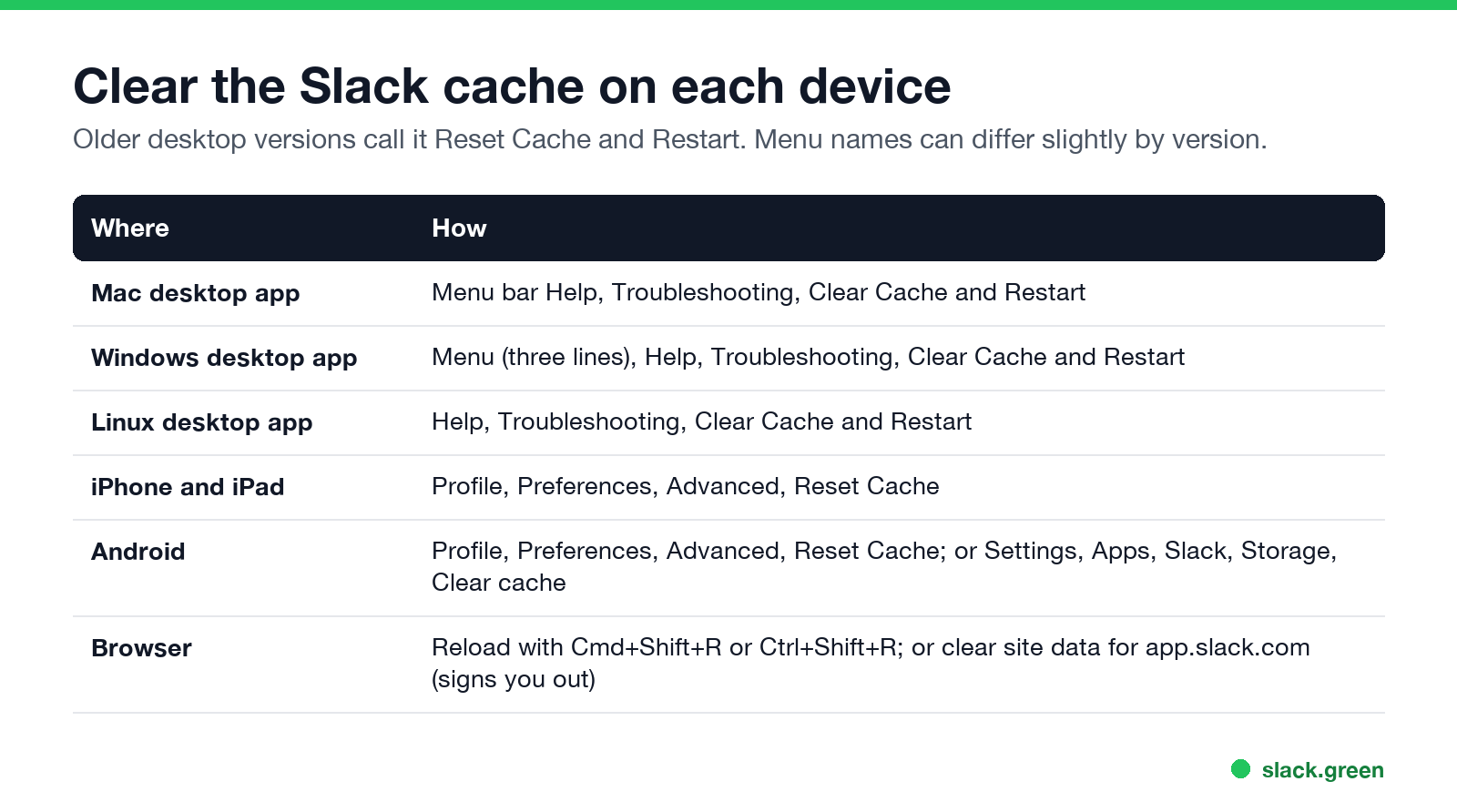
| Where | How |
|---|---|
| Mac desktop app | Help, Troubleshooting, Clear Cache and Restart |
| Windows desktop app | Three-line menu, Help, Troubleshooting, Clear Cache and Restart |
| Linux desktop app | Help, Troubleshooting, Clear Cache and Restart |
| iPhone and iPad | Profile picture, Preferences, Advanced, Reset Cache |
| Android | Profile picture, Preferences, Advanced, Reset Cache; or system Settings, Apps, Slack, Storage, Clear cache |
| Browser | Hard-reload; or clear site data for app.slack.com (signs you out) |
Menu names can shift slightly between versions. If you cannot find the option, search Slack's own help for "troubleshooting".
Slack cache location
The desktop app keeps its cache in its app data folder:
- • Mac (download from slack.com):
~/Library/Application Support/Slack - • Mac (App Store):
~/Library/Containers/com.tinyspeck.slackmacgap/Data/Library/Application Support/Slack - • Windows:
%AppData%\Slack
Use the built-in Clear Cache and Restart instead of deleting these folders by hand. Deleting the whole folder also removes your sign-in and settings on that computer, which is only worth doing if the app will not start at all.
When clearing the cache helps
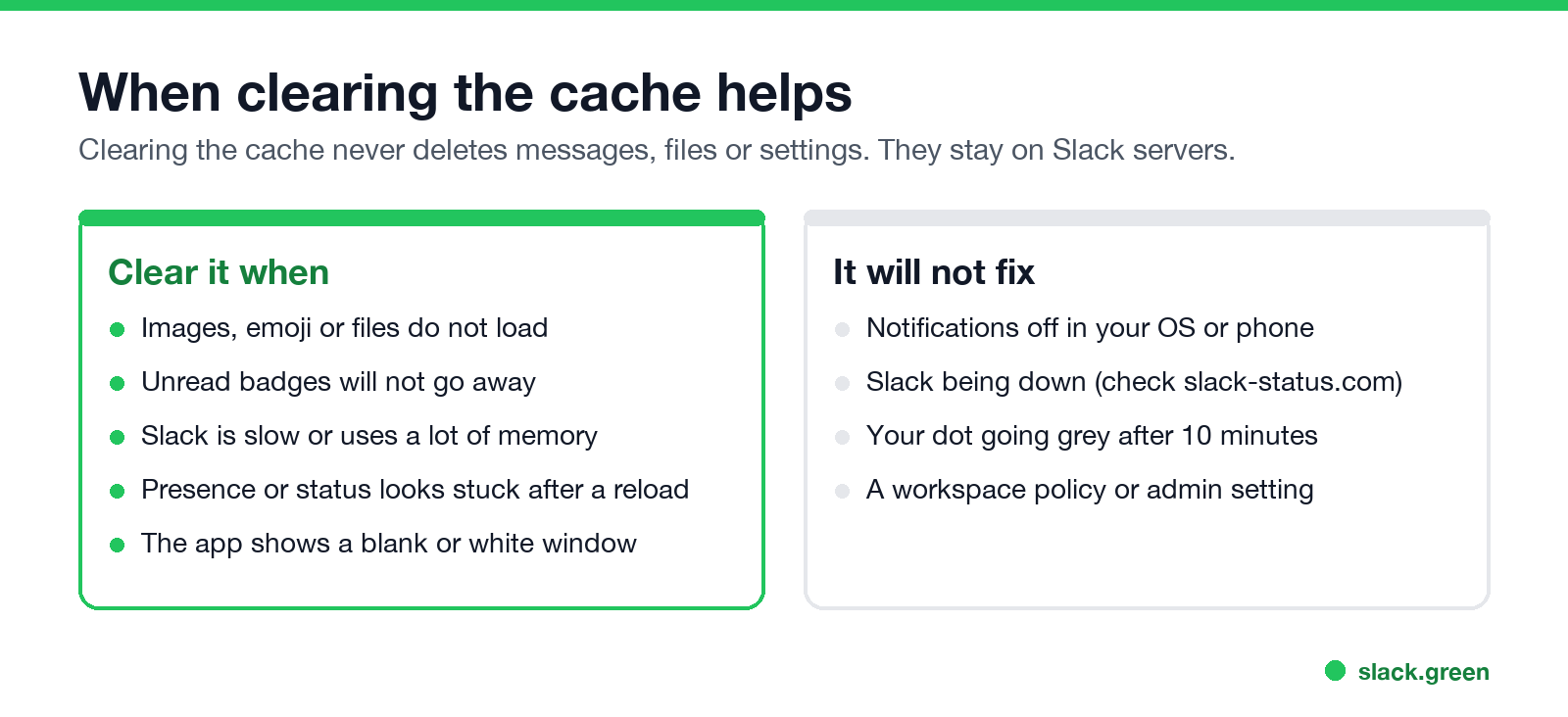
Clear it when:
It will not fix notifications turned off in your system settings (Slack notifications not working), an outage (check slack-status.com), or your dot going grey after 10 minutes, which is how Slack is built (how long does Slack stay active).
Is there a way to refresh Slack?
Yes. Press Cmd+R (Mac) or Ctrl+R (Windows) in the desktop app to reload it without clearing anything. Try that first; clear the cache if the problem stays. If the whole window is blank, see Slack desktop app blank or white screen.
FAQ
Does clearing the Slack cache delete messages?
No. Messages, files and settings stay on Slack's servers.
Will I be signed out after clearing the cache?
Not with Clear Cache and Restart in the app. Clearing site data in a browser does sign you out.
How do I clear the Slack cache on iPhone?
Profile picture, Preferences, Advanced, Reset Cache.
How do I clear the Slack cache on Windows 11?
Open the three-line menu, then Help, Troubleshooting, Clear Cache and Restart.
How often should I clear the Slack cache?
Only when something looks wrong. Slack manages its cache on its own.
Related Articles
Can Slack Admins See What You Search? And What Else They See
No. Slack gives admins no record of your search terms. On Enterprise they can see how many searches you ran each day. What admins see about edits, private channels, scheduled messages, analytics and read receipts.
Does Slack Notify When You Leave a Channel? Leave, Edit, Delete and More
Slack does not ping anyone when you leave a channel, but it posts a line saying you left, unless an admin turned join and leave messages off. Edits show (edited), deletes leave no alert, forwards do not tell the author, and removing someone does notify them. What each action shows, and how to leave quietly.
How to Connect Slack and Microsoft Teams: Calls, Messages and Status
Slack and Teams do not connect natively for chat. You can start Teams calls from Slack with the free Microsoft Teams Calls app, relay messages with a paid bridge such as Mio, and sync your Teams status to Slack with a short script. Every option, what it costs, and the setup steps.