
Can a Mouse Jiggler Be Detected? What IT and Monitoring Tools See
Yes, in most setups. Software jigglers show up as a running app and as injected input. USB jigglers show up as a second mouse in device logs. All of them leave an activity pattern. What each tool sees, with the queries IT uses.
Yes, a mouse jiggler can be detected, and how depends on the type. A software jiggler shows up as a running app, and on Windows its cursor movement carries an "injected" flag that any monitoring agent can read. A USB jiggler shows up as a second mouse in the device logs of a managed laptop. A mechanical platform that moves your real mouse leaves no device trace, but it still produces a pattern: a cursor that moves on a timer while the keyboard stays silent. No type hides the last signal, which is the work itself.
This is not a theory. In May 2024 Wells Fargo fired more than a dozen employees in its wealth and investment management unit. Its filings with FINRA, reported by Bloomberg, gave the reason as "simulation of keyboard activity creating impression of active work".
Most people who search this want one thing: a green dot in Slack or Teams while they read, think, or step away. A jiggler is a risky way to get it, and for Slack it often fails anyway. Slack Green keeps your Slack presence active from a cloud server on the hours you set. Nothing runs on your computer and nothing plugs into it, so there is no device or process to find. More on that at the end.
The three kinds of mouse jiggler, and the trace each leaves
| Type | How it works | Main trace |
|---|---|---|
| Software jiggler | An app that moves the cursor with system calls | A running process, and input marked as injected |
| USB jiggler | A dongle that tells the computer it is a mouse | A second mouse in the device list and endpoint logs |
| Mechanical platform | A small turntable or arm that moves your real mouse | No device trace, only the activity pattern |
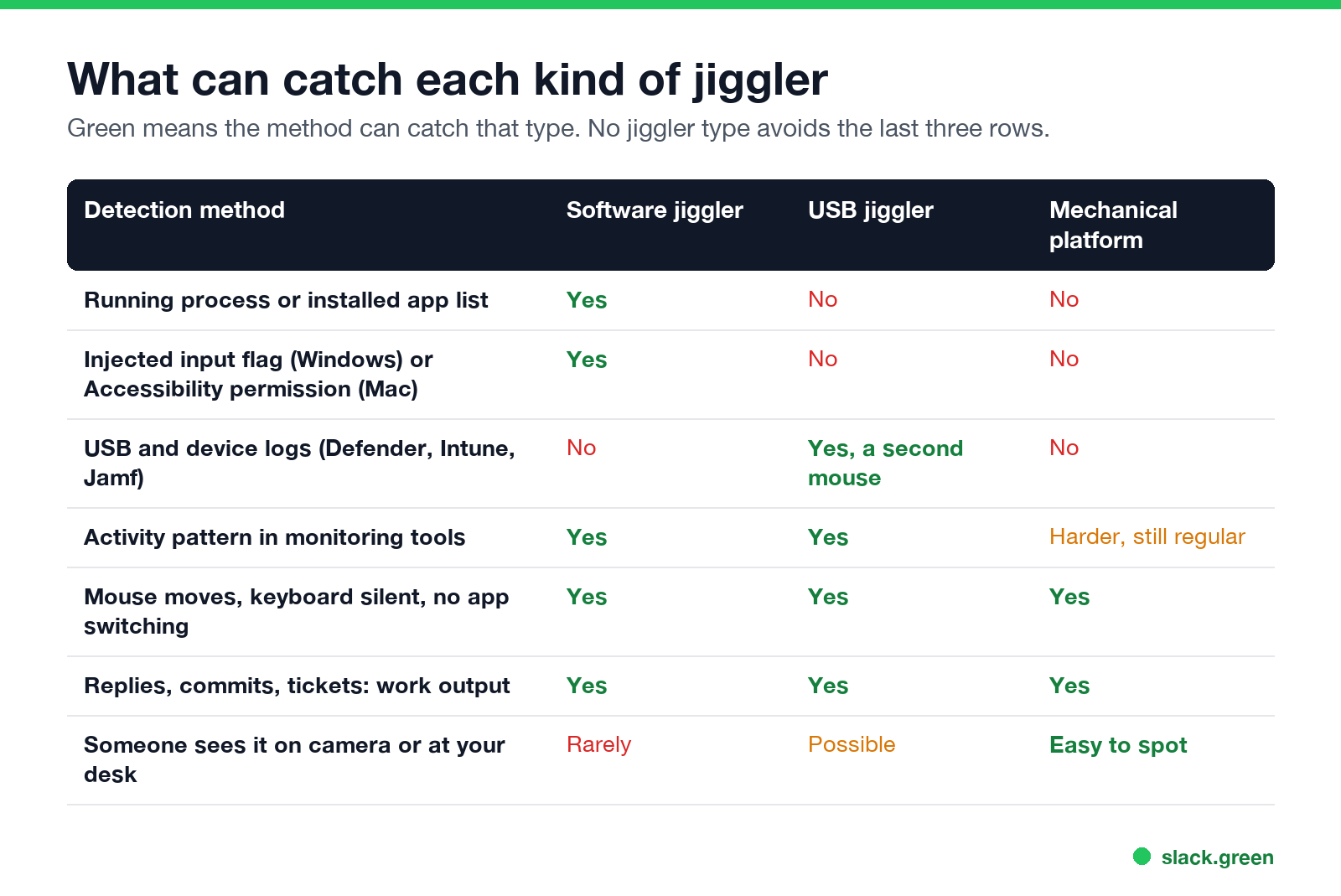
The table shows the pattern. Hardware beats the checks that look at the computer. It does not beat the checks that look at behavior, and those are the ones monitoring products sell.
Can a software mouse jiggler be detected?
Yes, and it is the easiest type to catch. Three separate checks find it.
The app list. A managed laptop reports its installed apps and running processes to IT through tools such as Microsoft Intune, Jamf, or an endpoint security agent. A process called Mouse Jiggler, Move Mouse or Caffeine stands out. The Arkane Mouse Jiggler README itself says it is easily detectable; see Mouse Jiggler for Windows. In a Microsoft community thread, an admin running Defender for Endpoint wrote that they had seen apps like Caffeine detected and asked how to catch the physical kind.
The injected input flag. On Windows, software creates mouse movement with the SendInput call. Windows marks every such event as injected. Any program with a low-level mouse hook, which is what monitoring agents use, can read the mark:
LRESULT CALLBACK LowLevelMouseProc(int nCode, WPARAM wParam, LPARAM lParam) {
    MSLLHOOKSTRUCT *m = (MSLLHOOKSTRUCT *)lParam;
    if (m->flags & LLMHF_INJECTED) {
        /* this movement came from software, not from a mouse */
    }
    return CallNextHookEx(NULL, nCode, wParam, lParam);
}
The permission on a Mac. On macOS, an app that moves the cursor needs Accessibility access. The app is listed in System Settings, under Privacy & Security, then Accessibility, and MDM tools can report that list.
Browser extensions that claim to keep you active sit in the same bucket. Managed browsers report installed extensions, and the best-known Slack ones were removed from the Chrome Web Store in 2024. The details are in Slack Chrome extensions.
Can a USB mouse jiggler be detected?
Nunca mais apareça como "ausente" no Slack
Na nuvem. Sem downloads. Funciona 24/7 mesmo com seu notebook desligado.
Yes, on a managed computer. A USB jiggler works because it tells the computer it is a mouse. That is also how it is found: the computer now has a mouse it keeps a record of.
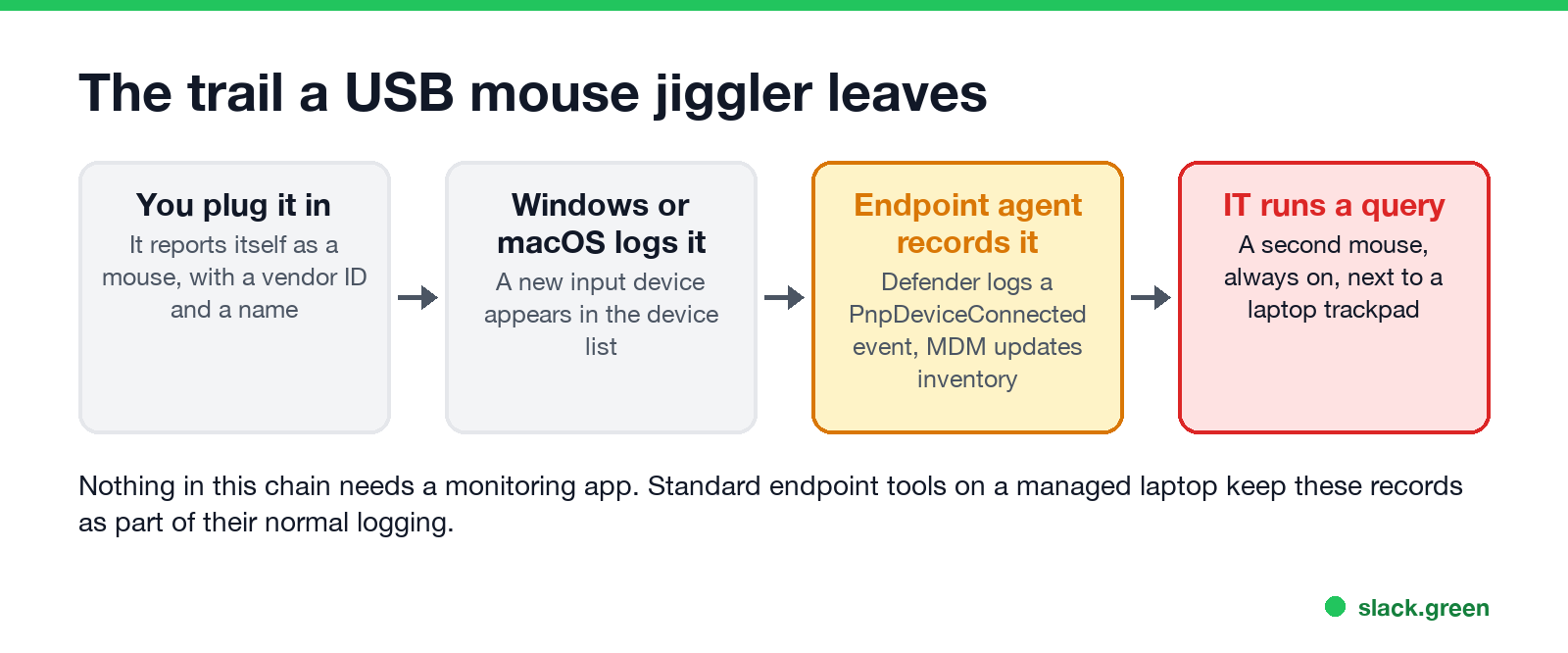
You can see what your own computer reports. On Windows, in PowerShell:
Get-PnpDevice -Class Mouse -PresentOnly | Format-Table FriendlyName, InstanceIdOn a Mac, in Terminal:
system_profiler SPUSBDataTypeEach line of the output is a device with a name and a vendor ID (the VID_ part of the Windows InstanceId). A laptop with a trackpad and one extra mouse that never stops moving is easy to spot in that list.
On company laptops with Microsoft Defender for Endpoint, every new device is logged as an event. Security teams search those events with a query like this one:
DeviceEvents
| where ActionType == "PnpDeviceConnected"
| extend DeviceDescription = tostring(parse_json(AdditionalFields).DeviceDescription),
         VendorIds = tostring(parse_json(AdditionalFields).VendorIds)
| project Timestamp, DeviceName, DeviceDescription, VendorIds
Sellers call some models "undetectable" because they report a generic mouse name or copy the vendor ID of a common mouse maker. That hides what the device is. It does not hide that a device was plugged in, and the pattern checks below still apply.
Two limits apply. First, nobody reads these logs by hand every day. They are pulled when a manager or HR asks IT to look at one person. Second, a personal computer with no company software reports nothing to anyone.
Can a mechanical mouse mover be detected?
Not from the computer. A platform that spins your real mouse, or an arm that nudges it, sends normal input from a normal mouse. No new device, no injected flag, no app.
It is still found in two ways. The movement is regular, often a small circle every few seconds, and it comes with no keyboard input at all. And it is easy to see: on a video call, at a hot desk, or when a coworker walks by.
Can monitoring software like Teams or Time Doctor detect a mouse jiggler?
Microsoft Teams and Slack do not look for jigglers. They only decide whether you are active. Teams sets you to away after 5 minutes of inactivity. Slack sets you to away after 10 minutes with no input in the Slack window. Neither app reports a jiggler to your manager. The risk sits in the rest of the Microsoft 365 or security stack your company runs, such as Defender, Intune, and sign-in logs.
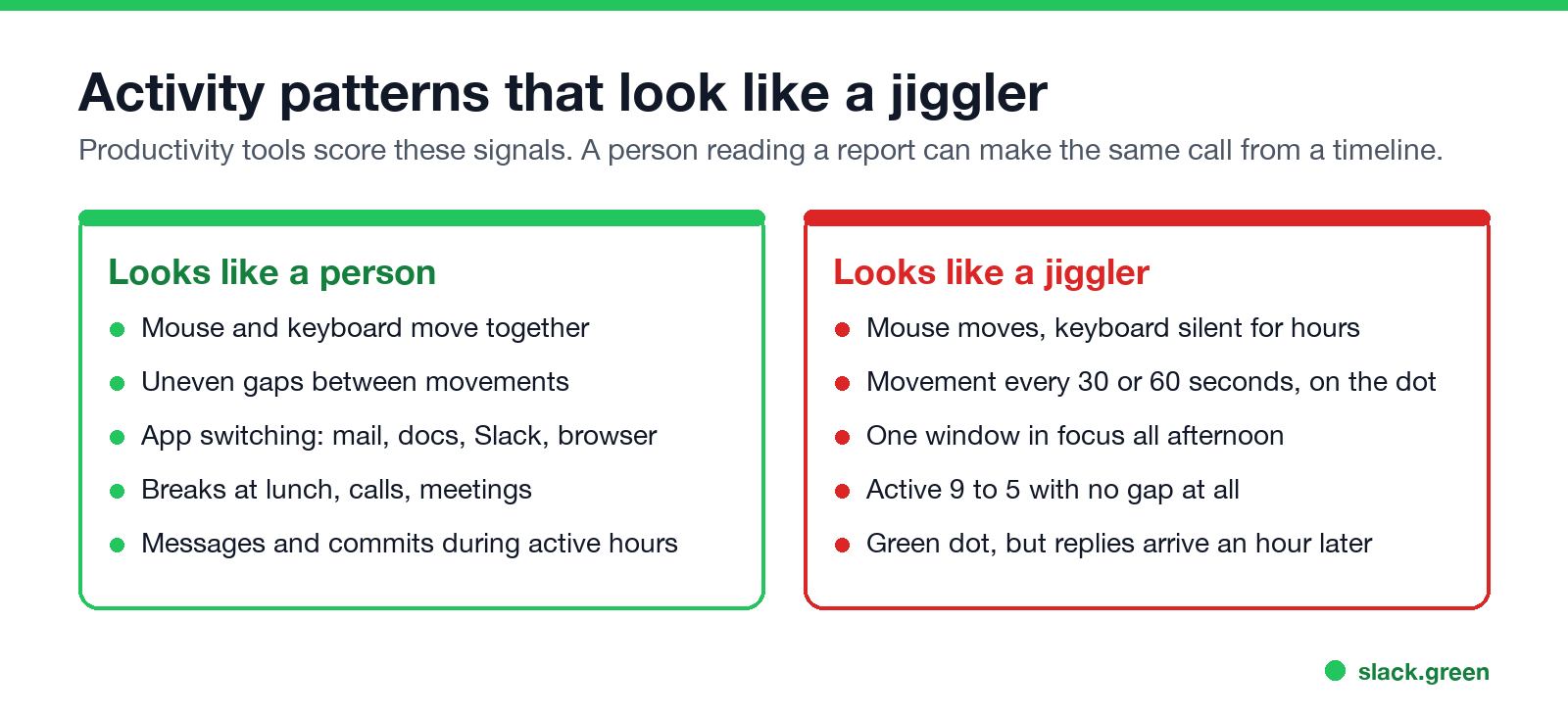
Monitoring tools such as Time Doctor, Hubstaff, ActivTrak and Teramind record activity over time. They log which app is in focus, how much keyboard and mouse input there was, and, depending on setup, screenshots. From that record a jiggler looks like the right-hand column above:
- • The mouse moves and the keyboard is silent for hours.
- • The movement comes every 30 or 60 seconds, on the dot.
- • One window stays in focus all afternoon.
- • The day has no breaks at all.
Screenshots taken on a timer make it simpler: the same screen, with the cursor in a slightly different place, forty times in a row.
Your manager needs none of this. A green dot and a reply an hour later tells them what a log would. Most "fired for a mouse jiggler" stories on Reddit start with a question about slow replies, not with an IT alert.
Does a mouse jiggler keep Slack active at all?
Nunca mais apareça como "ausente" no Slack
Na nuvem. Sem downloads. Funciona 24/7 mesmo com seu notebook desligado.
Often it does not. Slack counts only input inside its own window. A jiggler that moves the cursor over your email keeps the computer awake, and your Slack dot still goes grey after 10 minutes. It only works with the cursor parked over the Slack window, the screen unlocked and the lid open. The full comparison is in Slack Green vs mouse jiggler, and what Slack itself records about your activity is in does Slack track mouse movement.
So a jiggler used for Slack can carry the risks above and still show you as away.
A way to stay green in Slack with nothing on your computer
If the goal is a green dot in Slack while you work in other apps, the detection risk comes from putting something on the computer. Slack Green keeps your Slack presence active from its own servers during the working hours you set. On your laptop there is no app, no extension, no USB device and no injected input. It works with the lid closed.
What it does not change: your company can still read Slack access logs on paid plans, and your output is still your output. We cover exactly what each side can see in will I get caught using Slack Green. If you are comparing every option, including jigglers, start with how to keep Slack active, or read how to stay active on Slack without touching your mouse.
FAQ
Can my employer detect a mouse jiggler?
On a company laptop, usually yes. Software jigglers show up as apps and as injected input. USB jigglers show up as an extra mouse in device logs. Every type shows up in activity patterns if your employer runs monitoring software. On a personal computer with no company software, only the pattern and your output are visible.
Are mouse jigglers actually undetectable?
No. "Undetectable" in a product listing means the device reports a generic mouse name. The device is still in the logs, and the regular movement with no typing is still in any activity record.
Can Teams tell if you are using a mouse jiggler?
Teams itself only sees that you are active. It does not flag jigglers. Other Microsoft tools your company may run, such as Defender for Endpoint and Intune, can log the USB device or the app.
Can Time Doctor detect a mouse jiggler?
Time Doctor records app use, input activity and, if enabled, screenshots. A jiggler produces mouse input with no keyboard input and no app changes, which is visible in those reports.
Has anyone been fired for using a mouse jiggler?
Yes. In 2024 Wells Fargo fired more than a dozen employees after reviewing "simulation of keyboard activity creating impression of active work", according to its FINRA filings reported by Bloomberg. Whether using one is legal, and where the job risk sits, is in is it illegal to use a mouse jiggler.
Which mouse mover is not detectable by IT?
A mechanical mover leaves no device trace, but it leaves the same activity pattern as every other jiggler. If the goal is only a green dot in Slack, a cloud service like Slack Green puts nothing on the computer at all.
Pare de Mexer o Mouse.
Centenas de trabalhadores remotos não se preocupam mais com o status do Slack. Configure uma vez, fique verde para sempre.
Related Articles
Slack Saved for Later: Where the Later Tab Is and How It Works
Saved messages in Slack live in the Later tab, which replaced stars and Saved items in 2023. Hover a message and click Save for later, or press A. Add a reminder, mark items complete, and find them with is:saved. Where Later is on desktop and mobile, and what changed.
Slack Multiple Workspaces: Use, Switch and Stay Active in Each
You can sign in to several Slack workspaces in one app and switch with Ctrl+Tab or Cmd/Ctrl plus a number. Each workspace has its own account, status, presence and Do Not Disturb, so you can be active in one and away in another. How to add, switch and manage them.
Microsoft Teams Status Icons Meaning: Every Colour and Symbol
In Microsoft Teams, a green check means Available, red means Busy, In a meeting or In a call, red with a white bar means Do not disturb or Presenting, a yellow clock means Away or Be right back, a grey circle with an x means Offline, and a purple arrow means Out of office. Which ones Teams sets for you, and which wins.