
Caffeine 能让 Slack 保持活跃吗?实测:不能
Caffeine 能防止 Mac 休眠,但 Slack 只统计自己窗口里的操作。10 分钟后你照样会显示离开。本文说明真正有效的办法。
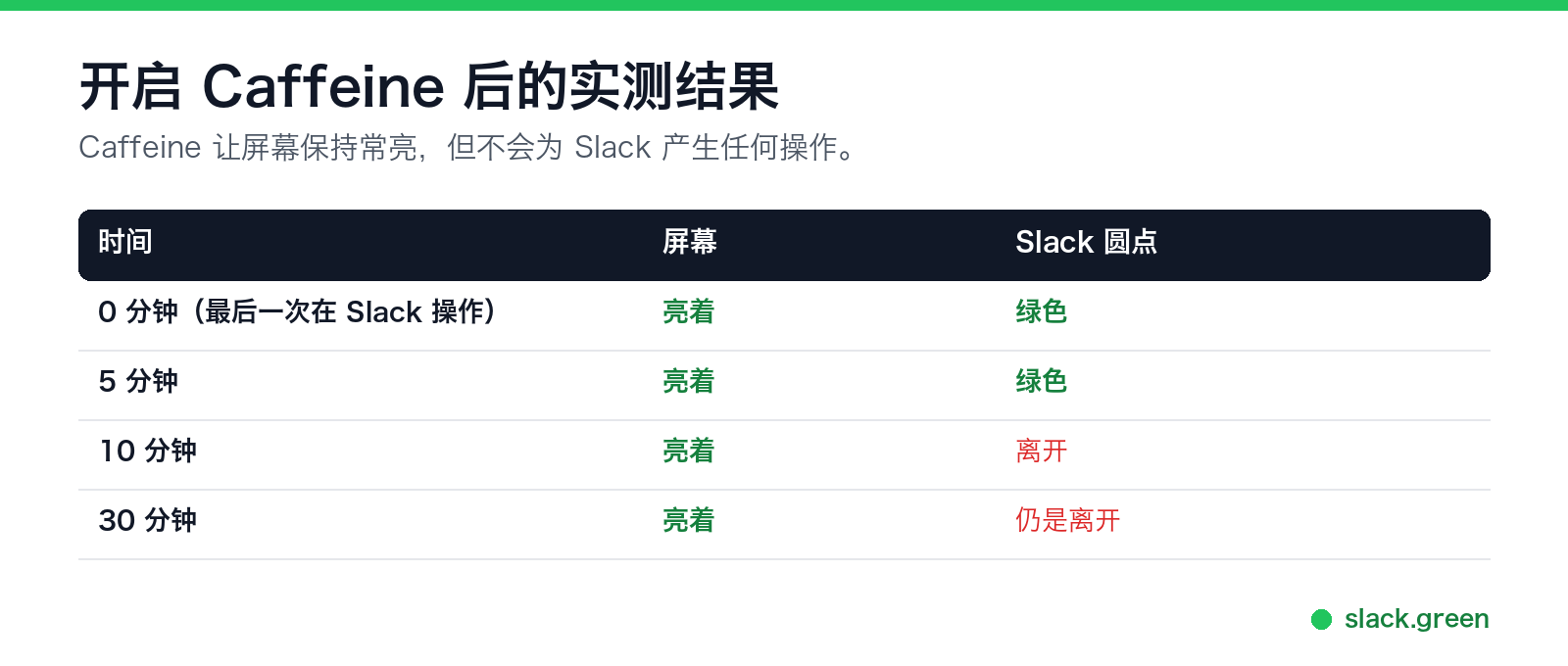
不能。我们实测过。Caffeine 让屏幕保持常亮,Slack 一直是绿色,到第 10 分钟时切换成了离开,而屏幕仍然亮着。Caffeine 解决的是休眠问题,而休眠只是Slack 把你显示为离开的原因之一。
我们开发了 Slack Green,它负责 Caffeine 做不到的部分。所以下面把两者的分工讲清楚。
Caffeine 做了什么
Caffeine 以及 macOS 自带的 caffeinate 命令,会阻止显示器和系统进入休眠。休眠或锁屏的电脑几秒内就会显示离开,Caffeine 确实能消除这个原因。如果你一离开座位圆点就变灰,这就是你的免费解决办法。
为什么 Slack 还是会把你显示为离开
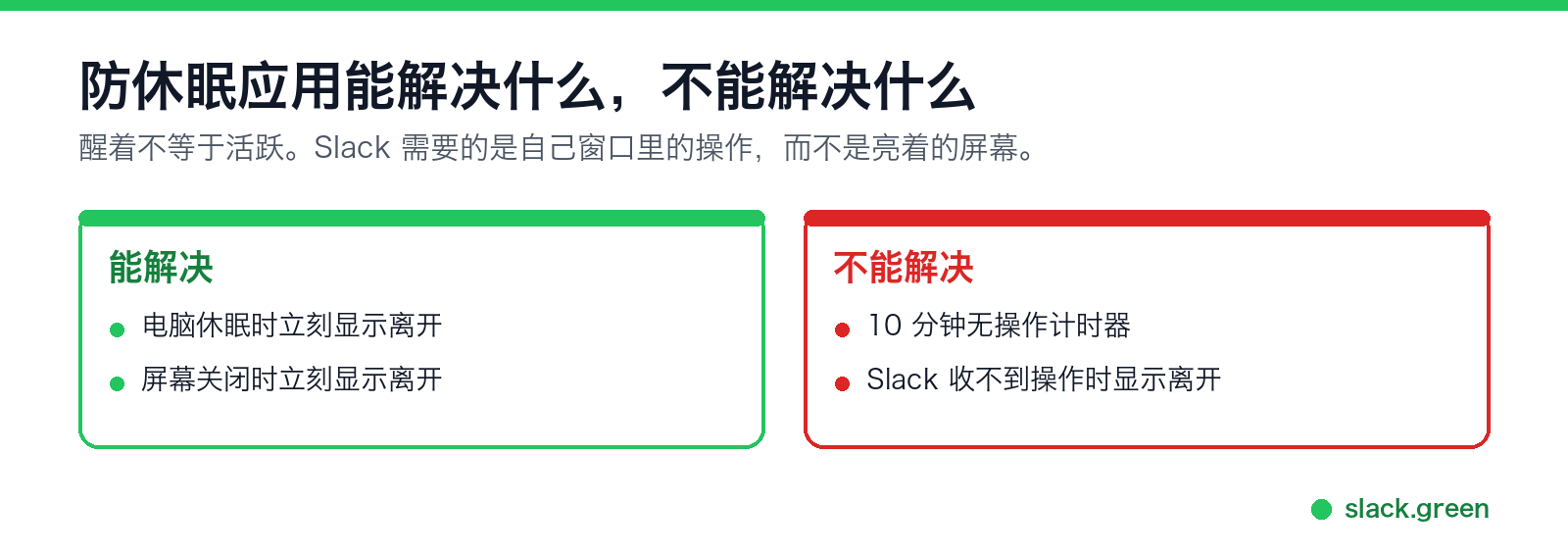
Slack 统计的是它自己窗口里的操作:点击、按键、滚动。亮着的屏幕不会产生其中任何一种。在你最后一次操作 Slack 的 10 分钟后,无操作计时器就会触发,无论屏幕是否亮着。
原理就这么简单,所以任何防休眠工具的结果都一样,Amphetamine 也不例外。醒着不等于活跃。
真正能保持绿点的办法
- • 在 Slack 里的操作:来自你本人、浏览器扩展,或对准 Slack 窗口的鼠标晃动器。只要电脑开着且没有锁屏就有效。
- • 服务器端的时间表。 Slack Green 从服务器保持你的会话,电脑休眠或关机都没关系。圆点跟随你的工作时间,而不是你的屏幕。
常见问题
caffeinate 能让 Slack 保持活跃吗?
不能。结果和应用一样:屏幕亮着,10 分钟后圆点变灰。caffeinate 的所有参数见我们的 caffeinate 指南,Windows 和 Linux 上的对应方法见没有管理员权限时如何让工作电脑不休眠。
Caffeine 对 Teams 或 Zoom 的在线状态有用吗? Teams 和 Zoom 的规则和 Slack 不同。它们统计的是整台电脑上任何地方的键盘和鼠标操作,而不只是自己窗口里的操作。Mac 版 Caffeine 不产生任何操作,所以 Teams 大约 5 分钟后照样变黄,Zoom 到达闲置时限后显示离开,默认是 15 分钟。Windows 版 Caffeine 是另一款应用:它每 59 秒按一次 F15,Windows 会把这算作操作,所以 Teams 通常能保持绿色。完整说明见 Caffeine 能让 Teams 保持活跃吗。在 Slack 里,播放视频和通话同样不算操作,见播放 YouTube 视频能让 Slack 保持活跃吗。
那为什么很多人推荐用 Caffeine 解决 Slack 的问题? 因为它解决了最明显的症状:电脑休眠时状态立刻切换。如果你从没注意到 10 分钟后的切换,Caffeine 看起来就像完整的解决办法。其实它只解决了一半。
有没有免费的完整方案? 没有什么都不用你做的免费方案。所有免费办法都需要电脑开着,并且持续有操作。各种办法的利弊见如何让 Slack 保持活跃。
总结
Caffeine 让屏幕保持常亮。Slack 要的是它自己窗口里的操作。这是两个不同的问题,Caffeine 只负责第一个。第二个问题,要么在座位上持续操作,要么把圆点交给时间表。
Related Articles
How to Keep Your Outlook Status Green (It Comes From Teams)
Your Outlook status shows your Microsoft Teams presence, so to keep Outlook green you keep Teams Available: Teams signed in and running, input on the computer, no lock or sleep, and no leftover status. What sets you Away, and what you can change.
Does Microsoft Teams Track Your Activity? What Admins Can See
Teams admins can see activity counts per person: messages in channels and chats, meetings, 1:1 calls, audio, video and screen share time, and your last activity date. Your status follows keyboard and mouse activity on the whole computer. Teams does not log keystrokes, your screen, or other apps.
Slack Desktop App Blank or White Screen? Fix It in This Order
A blank, white or black Slack window is usually a failed load, a corrupt cache, a blocked connection or a graphics driver issue. Reload with Cmd or Ctrl+R, use Help, Troubleshooting, Clear Cache and Restart, test Slack in a browser, update, then reinstall cleanly. Steps for Windows and Mac.