
How to Keep Your Slack Status Active All the Time, on Desktop and Phone
The Slack desktop app sets you away 10 minutes after your last keyboard or mouse input in any app, and no setting changes that. Six ways to keep Slack active, what each one covers, and where each one stops.
To keep your Slack status active and the dot green, the computer running the Slack desktop app needs keyboard or mouse input at least once every 10 minutes, or the Slack app has to stay open on your phone screen. There is no setting that turns the away timer off or makes it longer. Slack's API does not allow it either. On 5 October 2026 it rejected presence=active with invalid_arguments. So every method that works does one of three things: it creates input on your computer, it keeps a phone showing Slack, or it keeps your presence active from a server.
The rule Slack uses to decide you are active
The Slack desktop app reads the computer's idle time every 10 seconds, so a click, a keystroke or a mouse move in any app resets its 10-minute timer (Slack desktop 4.52.178 code, checked 7 Oct 2026). When the timer runs out, your dot turns into an empty circle and people see you as away. Typing in your editor keeps you green; a long call or a long read without touching anything does not. In a browser tab Slack cannot see other apps; our test tab stayed active for 30 minutes with no input. With a keep-awake app running and the screen lit, our dot stayed green until the 10-minute mark and then turned away, as measured in does Caffeine keep Slack active. The desktop app does not record where your mouse goes, only how long the computer has been idle; see does Slack track mouse movement.
Three other events set you away faster than the timer:
- • Sleep and screen lock. When the computer sleeps or locks, Slack sets you away almost at once.
- • Leaving the phone app. On iPhone and Android you are active only while Slack is open on screen. Switch apps or lock the phone and you go away within seconds.
- • Setting yourself away by hand. A manual away stays on until you undo it.
- Click your profile picture at the bottom left of the sidebar (top right in older versions).
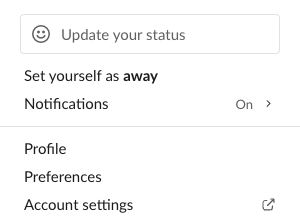
- Click Set yourself as active. While you are not set away by hand, the same line reads Set yourself as away, as in this menu from Slack for web on 5 October 2026:
- • Mac: System Settings, then Lock Screen. Raise Turn display off when inactive and Require password after screen saver begins or display is turned off. Or run
caffeinate -din Terminal, covered in caffeinate on Mac. - • Windows 11: Settings, then System, then Power & battery, then Screen and sleep. Or use PowerToys Awake, or a PowerShell keep-awake script.
Slack combines all your signed-in devices. If any one of them is active, you show as active. That is why a phone or a server can keep you green while the laptop sits closed. The timings for each device are in how long does Slack stay active, and the reason the flip feels so fast is in why Slack goes idle so quickly. You cannot change the 10 minutes, and can you change Slack's away time shows why no workspace setting does it either.
Six ways to keep Slack active, compared
| Method | Beats the 10-minute timer | Survives sleep and lock | Works with laptop closed | Cost |
|---|---|---|---|---|
| Set yourself as active | No | No | No | Free |
| Keep-awake app or longer sleep settings | No | Yes | No | Free |
| Mouse jiggler | Yes, while awake and unlocked | Yes | No | $10 to $35 |
| Script in the Slack browser tab | Only in that tab | No | No | Free |
| Phone with Slack on screen | Yes | Yes | Yes | Battery, a spare phone |
| Server-side presence tool | Yes | Yes | Yes | Monthly fee, often after a free trial |
The pattern is plain. Every method that runs on your computer needs the computer on, awake and unlocked, with Slack getting the input. Only a phone or a server keeps you green when the computer is off.
1. Set yourself as active
If you set yourself away earlier, Slack keeps you away. Undo it:
On the phone app, tap your profile picture, then Set yourself as active.
This undoes the manual away and nothing else. The 10-minute timer keeps running, so you go away again after 10 minutes without input. More on the menu and the automatic states in Slack away status meaning.
2. Keep the computer awake and unlocked
Sleep and lock set you away at once, so make both wait longer than your usual break.
This stops the instant away when the machine sleeps. It does not create Slack input, so the 10-minute timer still runs. We tested this with the most popular apps in does Caffeine keep Slack active and does Amphetamine keep Slack active. On a company laptop IT often locks these settings, and keep your computer awake without admin rights lists what still works.
3. A mouse jiggler
A USB jiggler tells the computer it is a mouse and moves the cursor every few seconds. A software jiggler does the same with an app. The Slack desktop app counts that movement wherever the cursor is, so a jiggler keeps it active while the computer is awake and unlocked. It does not cover sleep, a screen lock, a closed lid, Slack on your phone, or a company policy that locks the screen after a set time.
Jigglers leave a trace on managed laptops. A software jiggler shows up as a running app, and a USB jiggler shows up as a second mouse in device logs. The details are in can a mouse jiggler be detected, the legal side in are mouse jigglers legal, and setup per system in mouse jiggler for Windows and mouse jiggler for Mac. Which jiggler to buy, by type and price, is in the best mouse jiggler. The head-to-head is in a server-side presence tool vs a mouse jiggler.
4. A script in the Slack browser tab
If you use Slack at app.slack.com, a userscript or extension can create activity inside that tab. It targets the right window, but it breaks when Slack updates its page, when the browser unloads the tab to save memory, and when the screen locks. Scripts that call Slack's API cannot force you active at all, because users.setPresence only accepts auto or away. We sent both values from our own account on 5 October 2026:
curl -X POST https://slack.com/api/users.setPresence \
  -H "Authorization: Bearer $SLACK_USER_TOKEN" \
  -d presence=active
{"ok":false,"error":"invalid_arguments","response_metadata":{"messages":["[ERROR] must be a valid enum value [json-pointer:/presence]"]}}The same call with presence=auto returned {"ok":true}, and users.getPresence read the same before and after: presence: active, manual_away: false, connection_count: 1. auto hands your status back to Slack's own timer. It does not set you active. The full list of script types and which still work is in scripts that keep Slack active, and the browser-only traps are in keep Slack active in a browser and Slack Chrome extensions.
5. A phone with Slack on screen
Because Slack combines your devices, a phone with Slack open and the screen on keeps you active while the laptop is closed. Set the phone's auto-lock to never, keep it on a charger, and keep Slack in the foreground. On iPhone, Low Power Mode forces the screen to lock after 30 seconds and breaks the setup. Step-by-step settings are in keep Slack active on iPhone, keep Slack active on Android, and the overview in keep Slack active on mobile.
The cost is a phone that does nothing else, and a screen that stays on for hours.
6. Keep your presence active from a server
A server-side tool signs in to Slack as your own session, the way the Slack web client does, and keeps that session active. Slack sees an active device, so your dot stays green. Nothing runs on your computer and nothing plugs into it, so the laptop can be closed, asleep or off.
Slack Green works this way: you pick your working hours, it keeps your dot green through them with the laptop shut, and it lets Slack show you away after them, as in how to schedule Slack status. Tools of this kind use your own session tokens, the xoxc and xoxd pair, because a bot token has its own presence and cannot keep yours green. The trade-off is that you trust a service with a session token. Whether a presence tool can get you caught covers what an admin can and cannot see, and the self-hosted CLI runs the same engine with the tokens on your own disk. Other tools in this category are compared in top tools to keep your Slack status green and in a head-to-head with Idle Pilot.
Never appear "away" on Slack again
Cloud-based. No downloads. Works 24/7 even when your laptop is off.
Which method fits your day
Per-system guides: Mac, Windows, Linux, Chromebook. If you run Teams too, see keep Teams and Slack active.
What does not keep Slack active
These fixes show up in forum threads and video guides. Each one fails for a reason you can check.
If Slack shows you away while you are typing in it, the cause is different. Why Slack keeps showing you as away matches the moment the dot changed to the cause, and how to stop Slack from showing away has the fix for each.
FAQ
Can you set Slack to always active?
No. Slack has no always-active setting, and users.setPresence rejects presence=active. Set yourself as active only undoes a manual away. The 10-minute timer keeps running after it.
Can my manager see that I use a tool to stay active?
Slack shows your manager the dot, not the reason for it. What admins can see in analytics and logs, and what monitoring software sees on a company laptop, is in whether a presence tool can get you caught and can a mouse jiggler be detected.
Does a green dot mean someone is at their desk?
No. It means one of their signed-in Slack clients saw input in the last 10 minutes, or a phone has Slack on screen, or a server keeps the session active. The dot and the status text are separate, as Slack active status explained shows.
Stop Jiggling Your Mouse.
Join hundreds of remote workers who never worry about their Slack status. Set it up once, stay green forever.
Related Articles
How to See All Your DMs in Slack, Including the Hidden Ones
The DMs tab lists your direct messages with people. App DMs, Slackbot and DMs with deleted accounts sit elsewhere. We compared the tab with the full list the Slack API returned.
Slack Images Not Showing? 5 Causes We Reproduced
We uploaded images to a Slack test channel and then switched each image setting off, ran /collapse, and posted from a bot that was not in the channel. Five causes, each reproduced.
How to Message Yourself on Slack (and What It Notifies)
Your own name under Direct messages opens a private DM with yourself. We sent it a note, a file, a scheduled message and a reminder, and checked which ones raised a badge.